Step 1 · Setup
Set up your missions once
Define your mission types, checklists, and assigned providers by property. Biloki then uses this setup to automate everything.
Automatic assignment, timestamped photo checklist, mission report, all execution proof centralized.

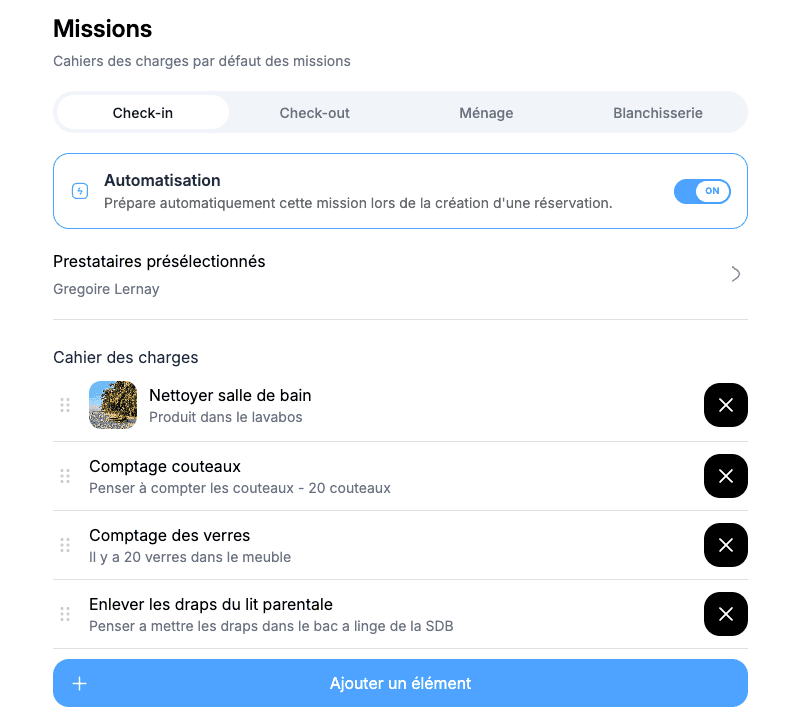
Step 1 · Setup
Define your mission types, checklists, and assigned providers by property. Biloki then uses this setup to automate everything.
Step 2 · Automatic trigger
CI, CO, M and B simply mean check-in, check-out, cleaning and laundry. Colors show at a glance whether a mission is pending, accepted, validated, completed or canceled.
Step 3 · Assignment
Each task is automatically sent to the assigned provider. Everyone receives only what concerns them, with no calls or reminders.
Step 4 · Field execution
The provider receives the mission in their mobile space: address, schedule, checklist, and access instructions. They tick tasks off as they go.
Step 5 · Monitoring & reporting
To do, in progress, completed, late: you manage your full operations from one screen. Every intervention is logged in a mission report available at any time.
With every booking, cleaning and check-in missions are generated automatically and assigned to the right provider. You no longer plan anything manually.

Each provider sees their daily missions in a dedicated workspace. You coordinate an entire property management team without spending your days on the phone.

Validated checklist, timestamped photos: every completed mission arrives as a clear report. You no longer need to ask for confirmation, the proof is already there.
Book a personalized demo and see how Biloki automates assignment, live tracking, and proof of completion for every mission.
Each booking can automatically trigger mission creation. Your team instantly sees what needs to be done, where, and when, without manual re-entry.
Yes. Missions are sent to their dedicated workspace with the key details (property, schedule, instructions), so you avoid back-and-forth messages.
Yes. You can monitor pending, in-progress, completed, or late statuses from one dashboard to prioritize quickly.
Yes. Each intervention leaves a trace in a mission report that you can review at any time to secure quality follow-up.
Yes. Mission planning works for both small concierge teams and larger operations with the same simple coordination flow.
Yes. You can also schedule other field operations such as laundry, inspections, or maintenance.
Yes. Booking data feeds the mission schedule so teams stay aligned with arrivals, departures, and turnovers.