Step 1 · Setup
Set up your missions once
Define your mission types, checklists, and assigned providers by property. Biloki then uses this setup to automate everything.
Automated review collection and responses.
.svg)

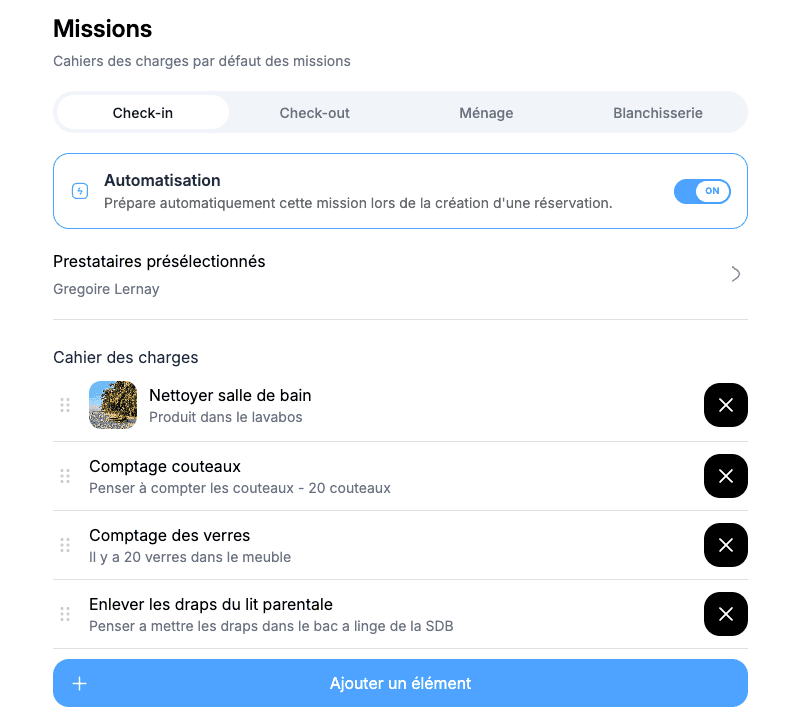
Step 1 · Setup
Define your mission types, checklists, and assigned providers by property. Biloki then uses this setup to automate everything.
Step 2 · Automatic trigger
CI, CO, M and B simply mean check-in, check-out, cleaning and laundry. Colors show at a glance whether a mission is pending, accepted, validated, completed or canceled.
Step 3 · Assignment
Each task is automatically sent to the assigned provider. Everyone receives only what concerns them, with no calls or reminders.
Step 4 · Field execution
The provider receives the mission in their mobile space: address, schedule, checklist, and access instructions. They tick tasks off as they go.
Step 5 · Monitoring & reporting
To do, in progress, completed, late: you manage your full operations from one screen. Every intervention is logged in a mission report available at any time.

With every booking, cleaning and check-in missions are generated automatically and assigned to the right provider. You no longer plan anything manually.

Each provider sees their daily missions in a dedicated workspace. You coordinate an entire property management team without spending your days on the phone.

Validated checklist, timestamped photos: every completed mission arrives as a clear report. You no longer need to ask for confirmation, the proof is already there.
Book a personalized demo and see how Biloki replaces manual back-and-forth with a reliable centralized workflow.
Yes, especially when you sell across multiple channels. You centralize calendars, reduce availability errors, and eliminate double bookings. Your team saves daily time and can focus on service quality.
Biloki connects to Airbnb, Booking, and many other channels. Bookings, availability, and key details are updated automatically in one calendar.
Initial setup is quick. In most cases, you can start in a few minutes with no complex migration.
Each new booking instantly updates availability on your other connected channels. This real-time sync limits calendar conflicts.
Yes. Biloki centralizes your stay schedule to keep operations clear for check-ins, check-outs, and related tasks.
Yes. The platform fits both small teams and larger operations. You can start simple and scale with your portfolio.
Yes. All key information is centralized, reducing communication duplication and helping everyone work from the same real-time source.